The shift to remote work has transformed how we approach our home office setups. Whether you're a digital nomad, full-time remote employee, or hybrid worker, choosing the right monitors for working from home can dramatically impact your productivity, comfort, and overall work satisfaction. This comprehensive guide will help you navigate the best monitor options for remote work in 2025.
Understanding Your Monitor Needs for Remote Work
Before diving into specific recommendations, it's essential to assess your unique requirements. Best monitors for remote work vary significantly based on your profession, workspace, and workflow.
Consider these factors:
- Your work type: Developers benefit from high resolution and screen real estate, while designers need accurate color reproduction. Video conferencing requires good built-in camera compatibility.
- Space constraints: Limited desk space might favor portable or all-in-one solutions over traditional multi-monitor setups.
- Budget planning: Quality monitors range from $150 for budget options to $1,000+ for professional-grade displays.
According to PCWorld's extensive testing, the Dell Ultrasharp U3225QE stands out as the best overall home office monitor, offering excellent 4K IPS Black panel quality, 140W USB-C Power Delivery, and comprehensive connectivity for $949.
Best Monitors for Working From Home by Category
Desktop Monitors: The Foundation of Your Setup
Standard desktop monitors (24"-32") remain the most popular choice for monitors for working from home. The sweet spot for most professionals is a 27-inch display with 1440p or 4K resolution.
Top recommendations include:
- Dell U2725QE: 27-inch 4K with Thunderbolt 4 and IPS Black technology
- ASUS ProArt PA279CRV: Excellent for creative professionals with 100% sRGB and 99% DCI-P3 coverage
- BenQ GW2786TC: Budget-friendly USB-C monitor under $200
These monitors typically offer ergonomic stands, flicker-free technology, and blue light filters—crucial for long remote work sessions.

Portable Monitors for Remote Work: Freedom and Flexibility
Portable monitors for remote work have become essential for digital nomads and flexible workers. These lightweight displays typically range from 13" to 17" and connect via USB-C for power and display.
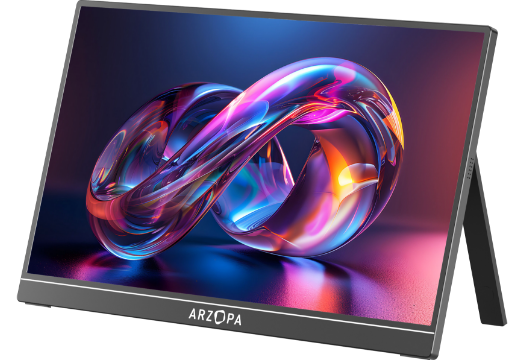
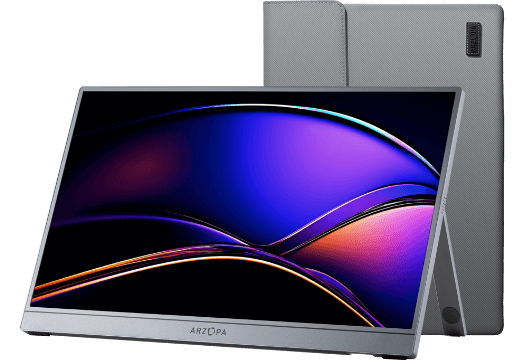
The Arzopa Z3FC exemplifies the best of portable monitor technology. This 16.1-inch QHD portable gaming monitor features:
- 2560x1440 resolution for crystal-clear visuals
- 180Hz refresh rate for smooth scrolling and responsiveness
- USB-C connectivity with power delivery
- Ultra-slim design weighing under 2 pounds
- 100% sRGB color gamut for accurate color representation
The Arzopa Z3FC is perfect for remote workers who need a second screen on the go—whether working from coffee shops, coworking spaces, or while traveling. Its high refresh rate makes it versatile enough for both productivity tasks and entertainment during downtime.
Dual Monitor Setups: Maximizing Productivity
Research consistently shows that dual monitor setups can increase productivity by 20-30%. For best monitors for remote work configurations, consider pairing a primary 27-inch 4K display with either:
- A secondary 24-inch vertical monitor for documents and communication tools
- Another 27-inch monitor for symmetrical dual-screen workflow
- A portable monitor like the Arzopa Z3FC for flexible third-screen needs
Ergonomic tip: Position monitors at equal distances from your eyes, with the primary display directly in front and secondary monitor at a 30-degree angle.
Ultrawide Monitors: The Space-Saving Alternative
Ultrawide monitors (34" and larger with 21:9 aspect ratio) offer screen real estate equivalent to two monitors without bezels. The Dell U4025QW provides 5K resolution across 40 inches, ideal for professionals who need multiple windows visible simultaneously.
Arzopa Portable Monitors: Your Remote Work Companion
While traditional desktop monitors excel for stationary setups, portable monitors for remote work like the Arzopa Z3FC solve a critical pain point: flexibility.
Key advantages of the Arzopa Z3FC:
- True portability: Fits in your backpack alongside your laptop
- Professional-grade display: QHD resolution rivals many desktop monitors
- Versatile connectivity: Single USB-C cable for both video and power
- Dual functionality: Perfect for work during the day, gaming or streaming at night
- Cost-effective: Fraction of the price of traditional second monitors

Remote workers consistently praise portable monitors for transforming any location into a productive workspace. As one digital nomad shared, "My Arzopa monitor has paid for itself ten times over in productivity gains while traveling."
How to Set Up Your Home Office Monitor Ergonomically
Even the best portable monitors for remote work won't help if positioned incorrectly. Proper ergonomics prevent neck strain, eye fatigue, and long-term health issues.
Follow these guidelines:
- Height: Top of the screen at or slightly below eye level
- Distance: 20-28 inches (arm's length) from your face
- Angle: Tilted slightly upward (10-20 degrees)
- Lighting: Minimize glare from windows and overhead lights
For dual monitors, position your primary screen directly in front and secondary at a 30-degree angle. If you use both equally, center the bezel gap in front of you.
Beyond Physical Monitors: Understanding Remote Work Monitoring
While searching for monitors for working from home, you may have also encountered information about monitoring remote workers. It's worth clarifying that this refers to software tools rather than physical displays.
Remote employee monitoring software like Teramind, Hubstaff, and Time Doctor help companies track productivity through time tracking, activity monitoring, and project management. These tools address employer concerns about remote work accountability.
However, the best approach balances productivity insights with employee privacy and trust. Transparent policies and focusing on output rather than constant surveillance create healthier remote work cultures.
Note: When setting up your home office, discuss monitoring expectations with your employer to ensure your monitor setup supports any required tools.
Common Mistakes to Avoid When Choosing Monitors for Remote Work
1. Prioritizing price over long-term comfort
Cheap monitors might save money initially but can cause eye strain and reduce productivity over time. Invest in quality displays with flicker-free technology and adjustable stands.
2. Ignoring connectivity needs
Ensure your monitor has appropriate ports (HDMI, DisplayPort, USB-C) for your devices. USB-C monitors with power delivery can charge your laptop while displaying content—essential for clean, cable-free setups.
3. Overlooking future expandability
Consider whether you might add a second monitor later. Monitors with daisy-chaining capability or multiple input sources offer flexibility as your needs evolve.
4. Neglecting color accuracy for creative work
If you work with photos, videos, or design, look for monitors covering at least 99% sRGB. The ASUS ProArt series and BenQ designer monitors excel in this area.

Your Remote Work Monitor Decision
Choosing the right monitors for working from home depends on your specific situation, but here's our quick recommendation guide:
- Best overall desktop monitor: Dell Ultrasharp U3225QE
- Best budget option: BenQ GW2786TC
- Best for creators: ASUS ProArt PA279CRV
- Best portable solution: Arzopa Z3FC 16.1" QHD Monitor
- Best for small spaces: Dell U4025QW Ultrawide
For remote workers who value flexibility, the Arzopa Z3FC portable monitor represents exceptional value. Its combination of professional-grade display quality, genuine portability, and versatile functionality makes it an ideal companion for modern remote work. Whether you're establishing a permanent home office or maintaining a mobile lifestyle, investing in the right monitor setup pays dividends in productivity, comfort, and work satisfaction.
Ready to upgrade your remote work setup? Explore the full range of Arzopa portable monitors and transform any space into your productive workspace.
Related Video Resources
- Monitor Buying Guide - What You NEED to Know
- BEST Monitors for Productivity GUIDE 2025
- Best Portable Monitor Buying Guide from $60 to $500
- 7 Best Employee Monitoring Software of 2024
Frequently Asked Questions (FAQ)
Q1: What is the best monitor size for working from home?
A: The ideal monitor size for working from home is 27 inches with 1440p or 4K resolution. This provides an excellent balance of screen real estate and desk space efficiency. For smaller desks, 24-inch monitors work well, while users with deep desks might prefer 32-inch or ultrawide options.
Q2: Are portable monitors good for remote work?
A: Yes, portable monitors like the Arzopa Z3FC are excellent for remote work, especially for digital nomads and flexible workers. They provide a second screen anywhere, connect via USB-C for easy setup, and offer professional display quality while weighing under 2 pounds. They're ideal for travel, coworking spaces, and temporary workstations.
Q3: Should I get a dual monitor setup for working from home?
A: Dual monitor setups can boost productivity by 20-30% for most professionals. They're particularly beneficial for tasks requiring multiple applications open simultaneously, such as coding, data analysis, video editing, and customer support. Consider your desk space and whether you frequently multitask before investing.
Q4: What connectivity should I look for in a home office monitor?
A: USB-C connectivity with Power Delivery is ideal for modern remote work setups, allowing a single cable for video, data, and laptop charging. Ensure the monitor has at least HDMI 2.0 or DisplayPort 1.4, and consider models with built-in USB hubs for connecting peripherals. Look for at least 60W power delivery for laptops.
Q5: How do I reduce eye strain when working from home with monitors?
A: Position your monitor 20-28 inches away at eye level, use the 20-20-20 rule (every 20 minutes, look at something 20 feet away for 20 seconds), enable blue light filters, adjust brightness to match ambient lighting, and choose monitors with flicker-free technology. Proper ergonomic setup is crucial for long-term comfort.