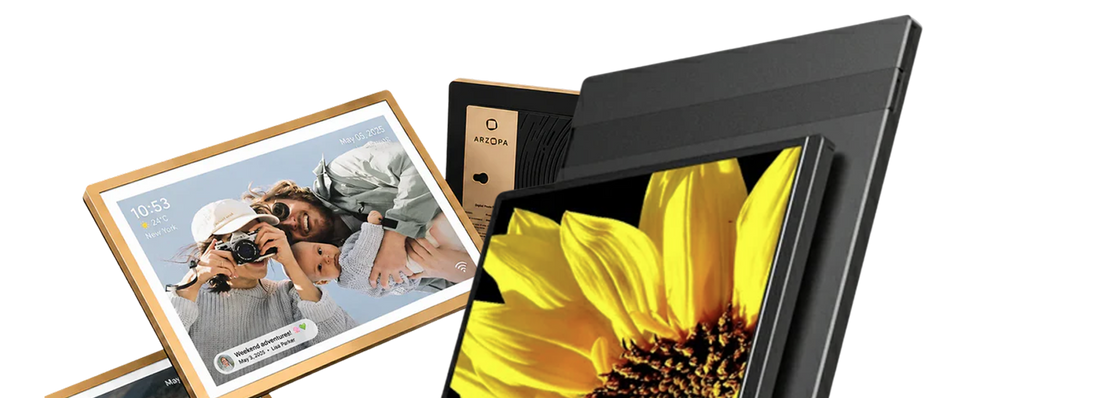
As the 2026 World Cup approaches, more and more football fans are starting to think about how to upgrade their viewing setup. Whether you are watching key matches at home or following schedules, stats, and highlights with friends, the right portable monitor can make match day more immersive and efficient.
A portable monitor suitable for sports streaming and World Cup viewing should be easy to carry, quick to connect, bright enough for comfortable viewing, and flexible enough to work with laptops, phones, game consoles, and streaming devices. For most fans, ARZOPA portable monitors strike a strong balance between screen size, portability, USB-C connection, HDMI support, and overall value.
If you want to watch the match on one screen while checking live stats, chats, or schedules on another, a portable monitor is a better match day upgrade than relying only on your phone.

Quick Answer: The Best Portable Monitor for Watching the World Cup
If you want a well-rounded option, the ARZOPA Z3FC is a great portable monitor for sports streaming, gaming, and World Cup viewing. It features a 16.1-inch screen, 2560 x 1440 resolution, 180Hz refresh rate, 400 nits brightness, and supports both USB-C and HDMI connections.
If you want a lighter travel screen, the ARZOPA A1 15.6-inch portable monitor is easier to pack in your luggage. If you want a larger shared screen, the ARZOPA A1M 17.3-inch portable monitor can make viewing more comfortable for friends and family.
Why Portable Monitors Are Good for Sports Streaming
Sports streaming, especially for a schedule-heavy and highly watched event like the World Cup, places higher demands on viewing devices. According to FIFA information, the 2026 World Cup will feature a new format with 48 teams, 104 matches, and will be hosted across Canada, Mexico, and the United States.
Compared with previous tournaments, more teams, a longer schedule, and more high-profile matchups mean fans may not only watch from the living room TV. They may also follow matches in different rooms at home, in the office, in a dorm, while traveling, or at a small viewing party.
This is exactly why portable monitors are well suited for sports streaming. They are larger than a phone screen, bringing a clearer match picture and a more comfortable viewing experience. At the same time, they are more lightweight than a traditional TV or desktop monitor, making them suitable for temporary viewing setups.
Whether you place one on a coffee table, desk, bedside table, or bring it to a friend’s house, hotel room, or outdoor gathering, a portable monitor gives fans more flexibility in how they arrange match day viewing.
In terms of connectivity, portable monitors are also better suited for multi-device use. You can use a laptop, phone, game console, or streaming device as the signal source, then use the portable monitor as the main display for watching the match.
For fans who want a more complete viewing experience, it can also be used in a dual-screen setup: one screen plays the live match, while the other shows live scores, player stats, fantasy sports lineups, group chats, or upcoming match schedules.
This multitasking viewing experience is one of the biggest practical advantages of a portable monitor compared with a tablet or phone. During the World Cup, matches often involve different time zones, groups, and back-to-back games.
Fans may need to follow the match itself, standings changes, qualification scenarios, injury updates, and social discussions at the same time. A portable monitor can display these elements across screens, reducing the interruption caused by constantly switching apps and making the viewing experience more immersive, efficient, and easier to share with family or friends.
5 ARZOPA Portable Monitors Recommended for Watching the World Cup
1. ARZOPA Z3FC: Best High-End Portable Monitor for Sports Viewing and Gaming

The ARZOPA Z3FC portable monitor is better suited for fans who want sharper details and smoother motion. With 2.5K QHD resolution, it can present a more refined match picture, making player movement, passing routes, and replay details easier to see.
The 180Hz high refresh rate also makes fast-moving visuals smoother, which is ideal for watching fast-paced, physical sports events, as well as playing football games, racing games, or action games before or after the match.
For users who like entertainment with a PS5, Xbox, Steam Deck, or laptop, the Z3FC also offers stronger gaming compatibility. Its 400 nits brightness helps maintain better visibility in daytime, near windows, or in brighter environments.
FreeSync support helps reduce screen tearing and stuttering, making both live matches and gameplay feel more stable and immersive. Therefore, the Z3FC is not only a portable monitor for World Cup viewing, but also a high-performance screen for sports streaming, console gaming, and mobile entertainment.
2. ARZOPA Z1FC: Best 144Hz Portable Monitor for Fast-Moving Visuals

The ARZOPA Z1FC is suitable for users who want smooth motion performance but do not necessarily need to choose a flagship model. It features a 144Hz high refresh rate, making quick passes, sprints, shots, and camera movements look smoother.
It is suitable for watching sports live streams and also for connecting to a PS5, Xbox, Steam Deck, or laptop for gaming entertainment. For users with a limited budget who still want a near pro-level gaming experience, the Z1FC is a more cost-effective choice.
In addition to smoothness, the Z1FC also covers 100% sRGB color, delivering more vivid and natural visuals. Whether you are watching World Cup live streams, movies, or using it for daily work and creative tasks, it can provide a better visual experience.
Its aluminum body combines a premium look with durability, making it suitable for frequent mobile use. The included protective sleeve also makes storage and carrying easier, whether you are setting up a viewing or entertainment space in different rooms at home, in the office, in a dorm, or while traveling.
3. ARZOPA A1M: Best Large-Screen Portable Monitor for Shared Viewing

The ARZOPA A1M 17.3-inch portable monitor is better suited for family viewing, friends, and small match day gatherings. Compared with common smaller portable screens, it offers a viewing area closer to a desktop monitor.
When two or three people watch a World Cup match together, the picture does not feel too cramped, and the score, player movement, and match details are easier to see.
The A1M uses a wide-angle IPS screen, making it suitable for multiple people sitting around from different angles. Whether for sports streaming, movies, or gaming entertainment, it creates a more immersive shared experience.
For fans who plan to watch matches for long periods during the World Cup, low blue light eye-care technology can also help reduce eye strain. The larger screen space is also suitable for split-screen use, such as playing the match on one side while viewing schedules, live stats, chat windows, or match analysis on the other.
4. ARZOPA Z1RC: Best 2.5K Portable Monitor for High-Definition Picture Quality

The ARZOPA Z1RC portable monitor is suitable for users who care about clarity and display space. With 2.5K resolution, it can present finer visual details. Whether you are watching sports, checking live scores and player stats, or handling documents and browsing web pages during halftime, it provides a clearer and more comfortable visual experience.
The Z1RC’s 16:10 aspect ratio can display more vertical content compared with a common 16:9 screen, making it more convenient to view schedules, standings, data tables, or long pages. It is also better suited for work and study scenarios.
The 123% sRGB color gamut gives the picture richer layers and more immersive color, making it suitable for watching World Cup live streams, highlights, and streaming content. It also supports portrait mode, which is useful for reading long articles, viewing code, browsing social feeds, or using it as an extended screen for a laptop.
For users who want both high-definition match viewing and daily productivity, the Z1RC is a very practical 2.5K portable monitor.
5. ARZOPA A1: Best Portable Monitor for Travel
The ARZOPA A1 15.6-inch portable monitor is very suitable for hotel rooms, dorms, offices, and travel backpacks. The 15.6-inch size is a classic size for portable monitors. It provides a larger viewing picture than a phone or tablet, while still taking up much less space than a TV or desktop monitor.
It is suitable for quickly setting up a World Cup viewing, work, or entertainment environment while traveling.
The A1’s slim and lightweight body makes it easy to put into a backpack or laptop bag. It is suitable for users who often work on the move, travel for business, or switch between different rooms.
Through USB-C connection, it can offer quick plug-and-play setup without complicated steps, turning a laptop into a dual-screen workspace. It can also be used for mirrored display or as a second screen.
Whether you are watching a match in a hotel room, following the tournament with friends in a dorm, or handling temporary work while traveling, the A1 can provide a more flexible large-screen experience.
Where to Watch the 2026 World Cup Legally: Streaming Platforms and Devices
Before setting up your portable monitor for World Cup viewing, make sure you are using an official and legal broadcast platform in your region. World Cup streaming rights vary by country, so the best place to watch depends on where you live.
In the United States, English-language coverage is available through FOX and FS1, while Spanish-language coverage is available through Telemundo and Universo. Streaming options may include official services such as FOX Sports, Tubi, Peacock, YouTube TV, Hulu + Live TV, Fubo, Sling TV, and DIRECTV, depending on your package and location. In the United Kingdom, World Cup matches are usually available through BBC, ITV, BBC iPlayer, and ITVX. In Canada, fans can check TSN, CTV, RDS, and their official streaming services.
For other countries and regions, always check the official broadcaster list or your local sports streaming provider before match day. Avoid unofficial live streams, as they may have poor picture quality, unstable playback, unsafe pop-ups, and potential copyright issues.
Once you have access to a legal stream, the viewing device is just as important as the platform. A laptop is one of the easiest choices because it can connect to a portable monitor through USB-C or HDMI. This lets you stream the match on a larger screen while keeping scores, group tables, or chats open on the laptop display.
You can also use a compatible phone, tablet, game console, or streaming device as the signal source. For phones and tablets, check whether the device supports video output through USB-C DisplayPort Alt Mode or requires an HDMI adapter. For game consoles and streaming sticks, HDMI is usually the simplest option.
A portable monitor does not replace the streaming platform itself. Instead, it upgrades the screen you use to watch. Whether you are watching from a hotel room, dorm, office, backyard, or living room, pairing a legal World Cup stream with an ARZOPA portable monitor gives you a cleaner, larger, and more flexible match-day setup.
```How to Connect an ARZOPA Portable Monitor for Sports Streaming
When your laptop, tablet, or phone supports video output, a USB-C portable monitor is the most convenient choice. Simply connect the device and the ARZOPA portable monitor with one USB-C cable, and power the monitor separately if needed. This is the cleanest connection method when traveling.
For HDMI devices, you can use the Mini HDMI port on the portable monitor. With the right cable or adapter, it can connect to many laptops, game consoles, and streaming devices.
For phones, you need to confirm whether the USB-C port supports DisplayPort Alt Mode. ARZOPA’s phone connection guide also mentions that older iPhones may require a Lightning to HDMI adapter.
For audio, built-in speakers are convenient, but a Bluetooth speaker or headphones can make World Cup matches feel more immersive. When watching long matches, it is also recommended to prepare a wall charger or power bank.
The Most Important Portable Monitor Features for Sports Streaming
The first thing to consider is screen size. A 15.6-inch portable monitor is best for travel, a 16.1-inch portable monitor offers a more balanced combination of size and viewing comfort, and a 17.3-inch portable monitor is better for shared viewing.
The second factor is resolution. A 1080p portable monitor is already enough for most sports streaming needs. A 2.5K portable monitor can show clearer grass texture, player details, and on-screen graphics.
Refresh rate is also worth considering. Sports live streams usually play at standard frame rates, but if you also play football games, racing games, or fast-paced console games, a 144Hz or 180Hz portable monitor will be more valuable.
Brightness, viewing angle, and stand design are also often underestimated. A stable stand helps with long viewing sessions, while higher brightness is better for offices, hotel rooms, and daytime environments.
Ports are also important. It is recommended to choose a product that supports both USB-C and HDMI.
Portable Monitor, Tablet, or TV: Which Is Better for World Cup Streaming?
When watching World Cup live streams, phones, tablets, TVs, and portable monitors can all be used as viewing devices, but they are suitable for different scenarios.
A tablet is simple to use and suitable for one person watching a match casually. A TV has a large screen and strong immersion, making it better for fixed living room viewing with multiple people.
A portable monitor sits between the two, balancing screen size, portability, and connection flexibility.
If you want to watch matches flexibly at home, in the office, in a dorm, in a hotel room, or at a gathering with friends, a portable monitor is the more practical choice.
It offers a larger display area than a phone or tablet, is easier to move and store than a TV, and can connect to laptops, phones, game consoles, and streaming devices. This makes it suitable for multi-scenario and multi-device World Cup viewing.
| Comparison Item | Tablet | TV | Portable Monitor |
|---|---|---|---|
| Screen Size | Usually larger than a phone, but still mainly for personal viewing | Largest screen, suitable for living room viewing | Larger than phones and tablets, suitable for personal or small-group viewing |
| Portability | Easy to carry | Not suitable for moving or travel | Slim and portable, suitable for different rooms at home, offices, travel, and gatherings |
| Connection Method | Mainly relies on apps and wireless casting | Relies on HDMI, TV boxes, or streaming devices | Supports USB-C, HDMI, and other connections; can connect to laptops, phones, game consoles, and streaming devices |
| Second-Screen Experience | Not very suitable as an extended screen for a computer or main device | Usually fixed as the main screen | Can be used as a main screen or second screen, suitable for watching the match while checking stats, schedules, or chats |
| Shared Viewing | Suitable for 1 person | Best for multiple people | Suitable for 1–3 people, more flexible for gatherings or temporary viewing setups |
| Travel/Temporary Scenarios | Convenient, but screen and ports are limited | Basically not suitable | Very suitable for hotels, dorms, offices, and travel |
| World Cup Viewing Advantage | Open an app and watch quickly, suitable for casual match viewing | Large picture, suitable for fixed setups and family viewing | Combines larger screen, portability, and multi-device connection, suitable for flexible match day setups |
| Main Limitation | Smaller screen and limited expandability | Not portable and fixed in usage scenarios | Needs to be used with a signal source device |
Overall, if you only watch World Cup live streams in a fixed living room setup, a TV is still the most immersive choice. If you just want to watch a match casually, a tablet is convenient enough.
But if you want to watch matches flexibly in different scenarios, or if you want to watch the live stream while checking live stats, standings, group chats, and schedules, a portable monitor is more suitable as World Cup viewing gear.
Among ARZOPA portable monitors, different models are suitable for different viewing needs:
| Viewing Need | Recommended Model | Why It Fits |
|---|---|---|
| Travel, hotel, or office temporary viewing | ARZOPA A1 portable monitor | Lightweight and easy to carry, suitable for mobile scenarios and temporary viewing setups |
| Sharper match picture | ARZOPA Z1RC or Z3FC portable monitor | Better for users who care about picture details, making player movement, replays, and tactical details clearer |
| Small gatherings or shared viewing | ARZOPA A1M portable monitor | Better for people sitting around together, suitable for friend gatherings, family viewing, or dorm scenarios |
Therefore, a portable monitor is not simply a replacement for a TV or tablet. Instead, it provides a more flexible way to watch World Cup live streams. It is suitable for fans who do not want to be limited to a fixed living room setup but still want a larger-screen experience than a phone or tablet.
Conclusion: The Best Portable Monitor for the 2026 World Cup
The best portable monitor for sports streaming and the 2026 World Cup should be easy to connect, comfortable to watch, and still useful after the tournament ends. ARZOPA portable monitors cover different needs, including travel, gaming, shared viewing, and second-screen match tracking.
FAQ
Can I watch the World Cup on a portable monitor?
Yes. You can connect a laptop, phone, tablet, game console, or streaming device and watch the World Cup on a portable monitor.
Is 1080p enough for watching football matches?
Yes. A 1080p portable monitor is enough for most sports streaming needs. If you want sharper details, you can choose 2.5K.
Do I need 144Hz or 180Hz for sports streaming?
Not necessarily. However, if you also play sports games or console games, a high-refresh-rate portable monitor will be more valuable.
Can a phone connect to an ARZOPA portable monitor?
Yes, as long as the phone supports video output. Some phones require USB-C DisplayPort Alt Mode, an HDMI adapter, or a wireless connection solution.
Is a portable monitor better than a tablet for sports streaming?
If you want a larger screen, second-screen usability, and more flexible device connection, a portable monitor is usually more suitable. A tablet is better for users who want an all-in-one device with built-in apps.

![How Much Brightness & Contrast Is Good for Eyes? [2026] - Arzopa](http://www.arzopa.com/cdn/shop/articles/how-much-brightness-contrast-is-good-for-eyes-2026-3024228.jpg?v=1788850861&width=1200)