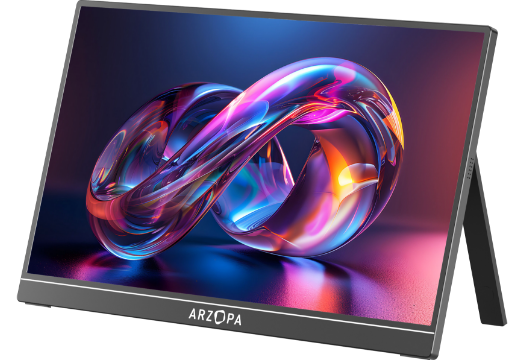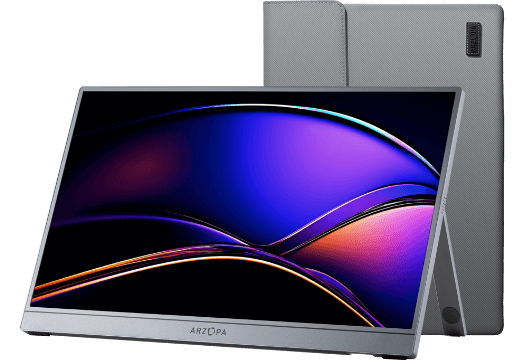

Have you ever found yourself in a café or on a high-speed train, staring at a tiny 13-inch laptop screen, constantly switching between Excel sheets and reference pages with Alt + Tab? It’s inefficient, frustrating, and enough to drive anyone crazy.
You want the freedom and productivity of dual-screen work, but you don’t want to be chained to a desk with a bulky monitor. That’s exactly the dilemma from which the portable monitor was born.
Portable monitors are a highly polarizing product. To digital nomads, they’re a “mobile workstation” that fits in a backpack. To others, they’re seen as overhyped gadgets with low brightness and too many wires, basically an expensive “tech tax.”

So in 2025, are portable monitors actually worth buying? And if they are, how do you avoid falling into specification traps?
This article gets straight to the point. Let’s break down the five core advantages that make portable monitors worth considering.
Are portable monitors worth it? 5 Core Advantages Explained
If you’ve already decided to buy one, this explanation may feel unnecessary. But for those wondering why portable monitors have exploded in popularity and are even called efficiency boosters, it’s because they offer more than “just another screen.”
1. Surprisingly affordable: Dual-screen freedom at the price of a small accessory
Are you facing this dilemma: wanting to boost productivity but unwilling to pay a premium for a second display?
Stop overspending on unnecessary alternatives. Many people buy an iPad or high-end tablet starting at $300+ just to achieve mobile dual-screen productivity. But do you really need its entire operating system and all those apps? A portable monitor focuses solely on display, which allows the price to stay in the $100–$200 range, purely delivering a high-quality extended screen.

Minimum investment, maximum productivity. Sure, you could buy a cheap desktop monitor, but it can’t follow you to a café or a train. The value of a portable monitor lies in combining lightweight mobility, ease of use, and zero desk footprint so you can enjoy dual-screen freedom anywhere at a low cost.
The real return on this investment isn’t just about the price. It’s about gaining exponential improvement in time efficiency and workplace freedom through minimal size and budget. With a budget-friendly portable monitor, you can transition seamlessly from office desk to café, from workplace to travel. A small investment that brings a big upgrade.
2. Minimalist Design & Mobile Freedom: A Truly “Carry-Anywhere Dual-Screen”
If a portable monitor isn’t slim and lightweight, its value drops to almost nothing. Its design philosophy is to remove all excess and build flexibility into its core.
So light you can almost forget it exists:
Most portable monitors weigh only 500 g to 1 kg, lighter than many tablets, with a thickness comparable to a magazine. Taking it on business trips adds almost no burden to your backpack.
No more chaotic setups:
Forget the bulky bases and tangled power cables of traditional monitors. Thanks to its foldable design and built-in stand, you can set it up securely on a café table or hotel desk in just 3 seconds, ready to work anytime, anywhere.
All-scenario flexibility:
Portrait & landscape rotation: Whether you need vertical mode for code logs or horizontal mode for design layouts, it easily switches orientation.
Touchscreen options: Some models support touch, giving you a more natural experience when presenting, annotating, or simply browsing.
Take it on the road and everything becomes smoother: remote collaboration, streaming, data monitoring, and creative work, without being trapped by a single tiny screen. It doesn’t feel like extra luggage — it feels like extra freedom.

3. Single-Cable Connectivity, Simple Setup: An Almost “Wireless” Experience
One of the biggest advantages of portable monitors is how they redefine external displays: the simpler it is, the more powerful it becomes. No complexity, no technical barriers, truly plug-and-play.
A clean desk, instantly:
No more bulky power bricks and multiple cables. Modern portable monitors support USB-C single-cable power + display, keeping your workspace neat whether you connect to a laptop or tablet.
True plug-and-play: Working in 10 seconds.
No drivers, no settings, no headaches. Plug in a Type-C cable and the screen lights up immediately. While traveling, your time goes to work, not device setup.
Professional-grade adjustments:
Worried simplified hardware means weaker display quality? No need. Portable monitors support brightness, color tuning, and HDR adjustment, delivering a visual experience comparable to a traditional desktop monitor.
Universal compatibility:
For example, ARZOPA models feature dual USB-C + Mini HDMI, enabling connections to laptops, desktops, phones, and even gaming consoles like Switch/PS5, meeting all multi-device needs with a single monitor.

4. High Resolution & Smooth Refresh Rate: Zero Compromise on Visual Quality
Worried that such a thin screen means poor image performance? Quite the opposite: modern portable monitors deliver uncompromised visual experience.
Crystal-sharp detail:
Most mainstream models come with 1080p or 2K resolution, offering fine detail and accurate color for photo editing and design work.
Living-room-level entertainment:
Connect your phone or gaming console and enjoy visual impact close to a household TV. With 60Hz+ to 140Hz refresh rate options, movies and Switch gameplay stay smooth with no motion blur.
Perfect for both work and play:
Professional: reliable color and detail accuracy
Entertainment: immersive and fluid visual performance
5. Real-World Value: Once You Own It, You Don’t Go Back
The true power of portable monitors is how they eliminate the conflict between dual-screen efficiency and mobility. It’s not an optional accessory — it becomes the silent core of your workflow and lifestyle.
A. Goodbye Alt-Tab Hell: The real salvation for productivity
End the mental drain:
Stop switching between documents, emails, and research pages dozens of times a day. Dual-screen productivity restores control and confidence.
Create professional space anywhere:
At home, in hotels, or cafés, it instantly builds an office-quality setup. No more cramped laptop screens. It’s a ritual upgrade every productivity-focused user deserves.
Confidence for on-the-go creativity:
Photographers and video editors can review and edit visuals without squeezing into tiny preview windows. A portable dual-screen workstation makes travel-based creation effortless.

B. Cross-boundary freedom: Unlock the “Free Mode” of life
Phone-to-workstation transformation:
Your flagship phone shouldn’t only serve short videos. With desktop mode plus a larger display, you can write documents, email, or handle light work anywhere.
Mobile cinema upgrade:
Stop watching movies or playing Switch on palm-sized screens. Enjoy TV-like visuals anywhere: powerful, immersive, portable entertainment.
Travel-proof survival tool for parents:
On planes and trains, playing cartoons becomes the easiest way to keep kids calm and give adults peace. A silent lifesaver for family travel.
Whether you need professional stability (business / creative professionals) or flexible freedom (students / digital nomads), portable monitors let you feel: “Efficiency has never been this simple. Freedom has never been this real.”
Benefits for Professionals: Real Gains for Different Roles
The value of portable monitors goes far beyond “mobile working.” When paired with the real demands of different professions, the efficiency boost is direct and impressive.
For Business Professionals: Professional, Efficient, Presentation-Ready
More professional presentations: During client meetings, roadshows, or partnership discussions, a portable monitor can serve as a secondary display. No more crowding around one laptop; conversations flow better, and the upgrade in professionalism is immediate.
Travel productivity without compromise: While traveling, stay just as efficient as you would in the office. Whether preparing proposals in a hotel or joining virtual meetings on the go, dual-screen workflows prevent chaos and keep everything organized.

For Students and Researchers: Learn Efficiently, Save Space
Smooth workflow: Writing papers, reviewing literature, and running data models needs more than one screen. With a portable monitor, you can write on the main display while referencing research or attending online classes on the second.
Dorm-friendly space saver: Dorms are tight. Portable monitors take far less space than bulky desktop displays, solving the conflict between study and living space.
For Creators (Photography, Video Editing, Design, 3D): Expand Your Creative Workspace
No more cramped windows: Multitasking across tools is painful on a single display. A portable monitor gives you extra screen real estate for timelines, previews, and toolbars, making creative work smoother and more intuitive.
Confident on-site previewing: Check color accuracy, clarity, and details directly on location with immediate screen review. Avoid discovering mistakes only after returning to the studio. Real-time preview is a must-have for professional production.

For Gamers and Entertainment Lovers: Immersive Fun Anytime
Your portable gaming station: Connect it to a Switch, PS5, PC, or phone to turn any location into a personal gaming zone.
Better experience: Enjoy higher-quality visuals compared to playing only on small device screens. Hotel rooms, dorms, cafés, anywhere becomes game-ready.
Upgrade your streaming: Movies and shows feel immersive again, without squinting at a phone.
For anyone who relies on screens for work or play, a portable monitor isn’t a luxury. It’s a solution to real problems of efficiency, experience, and space. It unlocks a freer digital lifestyle and elevates productivity and enjoyment in every scenario.
Portable Monitor Alternatives: What Are Your Plan B Options?
Before deciding to purchase a portable monitor, it’s smart to consider other common options on the market. By comparing portability, cost, and versatility, you can ensure you’re choosing the tool that best fits your needs.
① Laptop Monitor Extender (Dual/Triple-Screen Add-On)
These devices attach directly to the back of a laptop and unfold into dual or even triple screens. They don’t need a separate stand and take up zero desk space. In environments like trains, airport waiting areas, or compact hotel desks, they’re more stable than traditional portable monitors. The biggest advantage is the ability to expand to two or three screens at once, greatly improving productivity for coding, financial data analysis, reporting, and multitasking.
Drawbacks
Heavier to carry: More weight compared to a standalone portable monitor.
Limited compatibility: Not suitable for phones, tablets, or gaming consoles.
Higher price: Generally more expensive than standard portable displays.
Best for: Mobile professionals and developers who need multiple screens and maximum workspace.
② Tablets (iPad / Android Tablet)
Many users extend their screens using Sidecar (macOS) or third-party apps to turn a tablet into a secondary display. It’s a versatile option that combines entertainment and productivity, with touch features and full app ecosystems. It’s ideal for travel, online classes, reading, and light work.
Drawbacks
Latency issues: Connection stability varies, and noticeable delay affects complex tasks.
Unideal aspect ratio: Most tablets use vertical-leaning ratios like 4:3, unsuitable for professional software interfaces.
Higher cost: If the primary purpose is acting as a monitor, it’s far more expensive than a portable display.
Best for: Light productivity users, students, and anyone who already owns a tablet and values multifunctionality.
③ A Second Old Laptop (Budget-Free Emergency Option)
Using third-party software, an unused old laptop can be converted into an extra display. It’s cost-effective and reduces device waste, making it helpful when budgets are tight or temporary screen expansion is needed.
Drawbacks
Poor usability: Heavy, bulky, and absolutely not portable.
Complicated setup: Requires additional apps or network configuration.
Best for: Emergency desktop use only, not recommended for travel or outdoor work.
Conclusion: A Small Screen That Unlocks Big Efficiency and Freedom
A portable monitor isn’t a “nice-to-have gadget.” Once integrated into your daily workflow and lifestyle, the freedom of dual-screen work, flexible creativity, and seamless multitasking becomes hard to give up. It solves real pain points: limited efficiency, restricted desk space, exhausting travel, cramped entertainment, creative constraints, and inefficient study setups.
Whether you’re a productivity-focused professional, a quality-demanding creator, a student juggling research and documentation, or a gamer who wants to play anywhere, a portable monitor brings immediately noticeable improvement.
When productivity meets convenience, you’ll realize that the things that improve life aren’t always big, expensive machines but small tools you can take anywhere.
If you’re hesitating, ask yourself:
Do you want to keep struggling on a tiny laptop screen, or are you ready to upgrade your time and efficiency?
❓ FAQ
What is a portable monitor?
Simply put, it’s a standalone screen without a computer built in, as thin and light as a tablet.
Imagine taking the heavy monitor on your desk, flattening it, and turning it into something as portable as an iPad. That’s exactly what a portable monitor is.
It solves a very real problem: you need a second screen, but you don’t want to be tied to a bulky desktop monitor.
How do I choose the right portable monitor?
Screen size: Affects your workspace and portability. Larger screens are better for multitasking, smaller ones for travel.
Resolution: Determines clarity. 1080p is great for daily use, 2K/4K is better for design and content work.
Refresh rate: Controls smoothness. 60Hz for office and movies, 100Hz+ for gaming.
Ports & compatibility: Ensure it connects easily to your devices. USB-C single cable is the most convenient option.
Weight & build: Impacts mobility and durability. Lighter models are easier to carry, stronger stands support stable use.
Power: Check if it runs with a single cable or needs an external power source. Simpler means better on the go.
How durable are portable monitors?
High-quality portable monitors are absolutely capable of long-term stable use. Being thin and lightweight does not mean they’re fragile.
Most mainstream models use metal or high-strength composite shells, reinforced with tempered glass or impact-resistant display panels, and undergo multiple rounds of folding and drop testing.
Under normal use, their lifespan is comparable to traditional office monitors.
What devices can I connect a portable monitor to?
Almost every mainstream device you can think of can be connected to a portable monitor. It’s truly a universal secondary display.
Common compatible devices include:
Laptops: Windows / macOS / Linux are all supported for dual- or triple-screen productivity
Desktop PCs: HDMI connection works perfectly, same experience as a regular monitor
Phones & tablets (USB-C with DP Alt Mode): instantly turn them into mini computers
Gaming consoles: Switch, PS5, Xbox, Steam Deck play anywhere
Cameras: real-time monitoring for accurate color adjustment and framing on-site
Mini PCs / industrial PCs / Raspberry Pi: great for development and testing
In other words, if a device can output a video signal, it can light up a portable monitor.
It’s truly plug-and-play, no engineer or complicated setup required.