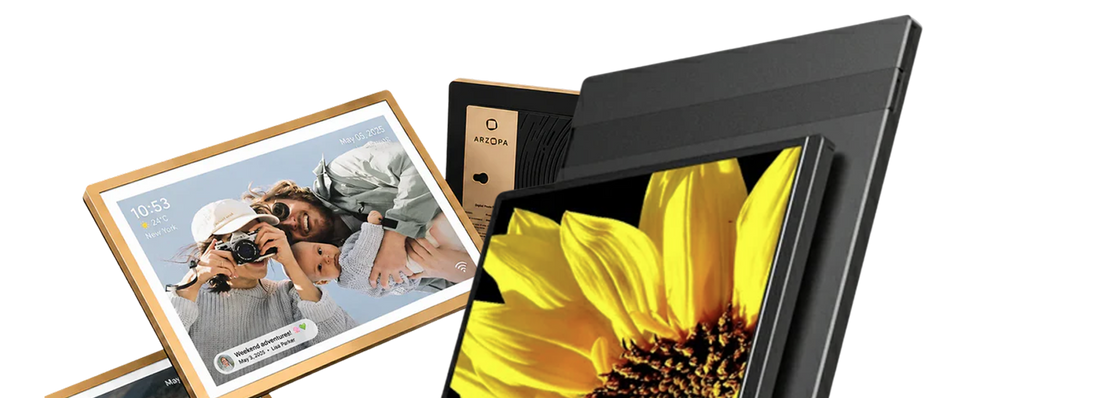
If you are looking for Skylight Calendar alternatives, do not look only at price first. Skylight’s value is not just a screen, but a smart family calendar that puts shared calendars, tasks, lists, meal planning, and family member views in one fixed place. What you really need to compare is: whether you want to avoid subscription fees, want a larger wall screen, want a kids routine system, or want to build your own information dashboard.
If your main goal is to stop paying continuously for Plus features, you can prioritize Arzopa C1, Cozyla, Apolosign, and Everblog.
If you want to manage children’s daily routines, chores, rewards, and habit-building, Hearth is more like a full family management system.
If you want to combine calendars, weather, photos, to-dos, Home Assistant, or different data sources into your own dashboard, DAKboard is more suitable for building your own information center.

Quick picks: the best Skylight Calendar alternatives worth checking first
Skylight’s baseline: Skylight’s core strengths are a mature experience, ready-to-use setup, and strong brand recognition — the 15-inch model is about $280-320, and the 27-inch Calendar Max is about $600-630. Basic calendar features are free, but advanced features such as Photo Screensaver, Meal Planning, Magic Import/Sidekick, and Rewards require a Plus subscription, about $79/year. Below is the real comparison between each alternative and Skylight:
| Recommended choice | Best for | Advantages compared with Skylight |
|---|---|---|
| Arzopa C1 | People who want a subscription-free desktop/countertop calendar screen | ✅ Completely subscription-free, all features are available after purchase ✅ 14-inch countertop-friendly design, with automatic landscape/portrait rotation ✅ Voice + photo input, supports Google/Apple/Feishu/Outlook/Hotmail/Cozi/TeamSnap |
| Cozyla Calendar+ 2 | People who want no subscription, a large screen, and more App freedom | ✅ Completely subscription-free ✅ More screen size choices (15.6/24/32 inches), more flexible than Skylight’s 15/27 inches ✅ Android system + Google Play, can install streaming, browser, and other Apps |
| Hearth Display | Families with children who value routines and chore rewards | ✅ Focuses on child development: designed with input from child development experts to help children build independence and habits ✅ 27-inch large screen, with deeper features than Skylight such as emotional check-ins, streaks, and rewards ✅ Children can operate it independently, and even children who cannot read yet can follow processes through icons and taps |
| DAKboard | Users who want to build their own dashboard | ✅ Extremely flexible: freely combine modules such as calendars, weather, photos, news, Home Assistant, and more ✅ Supports 100+ data sources including Google/Apple/iCloud/Office365/Instagram/Facebook ✅ Has a free plan, and the wood-frame design looks better than Skylight’s plastic feel |
| Apolosign | People who want a subscription-free large Android calendar | ✅ Completely subscription-free ✅ Multiple size choices (15.7/21.5/27 inches) ✅ Calendar + Android dual-mode switching, customizable layouts, Google Photos backgrounds, and more |
| Everblog | People who want no subscription and an interface close to Skylight | ✅ Completely subscription-free, recommended by WIRED ✅ Interface is the closest to Skylight, not Android-tablet style ✅ Covers core features such as Calendar, Chores, and Meal Plan |
| Smart Display | People who already have Echo Show/Nest Hub and only want to view calendars lightly | ✅ Low cost, many families already have one ✅ All-in-one functions: voice assistant, weather, music, smart home control |
Why do many people look for Skylight Calendar alternatives? / What are the negatives of Skylight Calendar?
- Subscription-locked features: after buying the hardware, the most attractive features are still behind a paywall
- Long-term cost: hardware + 2-3 years of subscription naturally gets compared with Skylight Calendar alternatives no subscription and cheaper Skylight Calendar alternatives
- Syncing details: two-way syncing is mainly concentrated on Google Calendar and Skylight’s own service, while most others are one-way display
- Family adoption cost: if only one person maintains it, even the best calendar will sit idle
- Screen scenarios: some people want a large wall screen, some only need a countertop screen; some want focus with no distractions, while others want App freedom
What standards should you look at when evaluating Skylight alternatives?
When choosing a digital family calendar, do not look only at screen size. The questions that truly affect long-term use are the following.
- Whether there is a subscription fee: hardware price is only the first layer. Whether meal planning, AI import, photo screensaver, rewards, and routines require extra payment determines the long-term cost.
- Whether syncing is reliable: at minimum, check whether Google Calendar, Apple/iCloud, Outlook/Microsoft, Yahoo, CalDAV, and ICS URL are supported; also distinguish between “can display” and “can edit two-way.”
- Whether it is suitable for wall or desktop use: a 27-inch large screen is suitable for hallway, kitchen wall, and entryway; 14-16 inches are more suitable for counter, desk, and kitchen island.
- Whether it has AI task import: users now increasingly care about whether they can take photos of school flyers, screenshots, emails, and menus, then automatically turn them into schedules, tasks, or recipes.
- Whether chores and rewards feel natural enough: if there are children at home, whether task assignment, star rewards, and routine check-ins are easy to use will matter more than a pure calendar view.
- Whether meal planning is practical: many reviews repeatedly mention meal planning, because dinner, shopping lists, and recipes are part of a family schedule, not add-on features.
- App flexibility: Skylight takes a closed, simple, low-distraction route; Cozyla/Apolosign take the Android tablet route; DAKboard takes the dashboard customization route. There is no absolute good or bad, only whether you want worry-free use or freedom.
- Whether family members are willing to use it: if older adults, children, and partners are not willing to open the app or tap tasks, even powerful features will sit idle.
Detailed overall comparison table of alternatives
| Product | Subscription fee | Screen size | One-sentence positioning | Calendar syncing (core) | ⚠️ Note |
|---|---|---|---|---|---|
| Arzopa C1 | None | 14 inches | Countertop subscription-free calendar screen | ✅Google ✅Apple ✅Feishu ✅Outlook ✅Hotmail ✅Cozi ✅TeamSnap | Focuses on calendar functions and does not support installing third-party Apps (cannot watch videos, browse the web, etc.) |
| Cozyla C+2 | None | 15.6/24/32 inches | Android calendar screen, multiple sizes + App freedom | ✅Google ✅Apple ✅Outlook ✅Yahoo ✅CalDAV | Syncing is not instant; feels more like an Android tablet |
| Hearth | Yes (~$9/month) | 27 inches | Kids habits + routine management system | ✅Google ✅iCal ✅Outlook | Expensive hardware ($699) + subscription |
| DAKboard | Free / $6-10/month | Self-provided | DIY information dashboard, extremely flexible | ✅Google ✅Apple ✅Office365 ✅ICS | Requires self-provided hardware; not ready to use out of the box |
| Apolosign | None | 15.7/21.5/27 inches | Android large-screen calendar, multiple sizes | ✅ Google Calendar ✅ Apple iCloud ✅ Microsoft Outlook ✅ Yahoo |
Setup requires patience; feels more like an Android tablet |
| Everblog | None | Large screen | Interface closest to Skylight | ✅ Google Calendar ✅ Microsoft Outlook ✅ Apple Calendar ✅ Yahoo ✅ Cozi |
Syncing has delays; photo upload experience is average |
| Smart Display | Usually none | Multiple sizes | General-purpose smart screen (not a dedicated calendar) | Depends on the Amazon/Google ecosystem | Calendar is only one feature, not the center |
7 Skylight Calendar alternatives worth considering
1. Arzopa C1: Best subscription-free display-based Skylight alternative

✅ Reasons to choose Arzopa C1
- No subscription fee, 14-inch countertop calendar screen, suitable for the kitchen, study, and dining room
- Gravity-sensing automatic landscape/portrait rotation — use landscape for weekly plans and portrait for today’s to-dos
- Smart light sensor automatically adjusts brightness, so it is not harsh on the eyes
- Covers schedule display, task to-dos, growth rewards, meal planning, smart recipes, screen-off photo album, and sleep mode
- Voice adds schedules (“meeting tomorrow at 3 p.m.” automatically generates an event)
- Photo recognition import (school notices, menus, and notes can be captured into tasks or recipes with one tap)
- Supports iCloud, Outlook, Hotmail, Cozi, and Teamsnap syncing
⚠️ Things to note
- 14 inches is suitable for counter/desktop use, not for scenarios that require a 27-inch large wall screen
- Does not support Android App expansion — this is a limitation for users who want streaming, browsers, and similar functions, but it can be an advantage for users who want a focused family calendar
2. Cozyla Calendar+ 2: The most important similar no-subscription competitor

✅ Reasons to choose Cozyla
- No ongoing subscription fee
- Supports Google/Apple/Outlook/Yahoo/CalDAV (cross-platform family-friendly)
- Multiple screen sizes, can install Android apps (streaming, browser, etc.)
⚠️ Things to note
- Syncing sometimes needs the App to be opened before refreshing — it is not always “instant syncing”
- Freedom is higher, but it also feels more like a “large Android tablet,” not as focused as Skylight
3. Hearth Display: Suitable for families that put kids routines first

✅ Reasons to choose Hearth
- Its core positioning is a “family habit-building system,” not just a calendar — helping children build independence and helping parents remind them less
- Covers routines, rewards, streaks, to-dos, meal planning, Hearth Helper, and emotional check-in
- Especially friendly for families with school-age children, children with ADHD, multiple children, or complex morning and evening routines
- 27-inch vertical large screen, suitable for wall mounting or fixing in a shared family area, clear at a glance
⚠️ Things to note
- The hardware price is relatively high, about $699, and 27 inches requires wall space or fixed space, not the type you can casually place on a counter
- Family Membership has monthly payment of $9/month, annual payment of $86.40/year, and multi-year plans, and the full value depends on the subscription
- Core calendar syncing and profiles can be used without a subscription, but advanced features such as rewards, streaks, and Hearth Helper require a subscription
- If the user only wants a subscription-free digital calendar, Hearth is not the most natural choice
- Best suited for families that put children’s routines and family behavior systems first and are willing to keep paying for this system
4. DAKboard: Suitable for a DIY dashboard, not a same-category hardware replacement for Skylight

✅ Reasons to choose DAKboard
- Extremely flexible, freely combines modules such as Google Calendar, Apple iCloud, Microsoft Office365, ICS feed, weather, photos, news, and to-dos on the same screen
- Free plan supports a basic screen + up to 2 calendars; Essential/Plus unlock more custom screens, calendar counts, refresh frequency, and integrations
- Suitable for tech-oriented users, Home Assistant users, and office/family shared dashboard scenarios
- Can be more personalized than Skylight — layout, data sources, and display content are completely decided by you
⚠️ Things to note
- You need to choose hardware, configure the screen, and adjust the layout yourself — it is essentially a DIY project, not plug-and-play
- Family calendar search users usually want to “reduce management burden,” but DAKboard instead increases the configuration burden
- Not suitable for families expecting “buy it, finish setup in ten minutes, and everyone can use it”
- If the core need is “family calendar” rather than “custom dashboard,” DAKboard may exceed the actual need
5. Apolosign Digital Calendar: Subscription-free, but you need to accept an Android-style experience
✅ Reasons to choose Apolosign

- No subscription fee, buy once and use, with many size choices
- Supports dual-system switching between Calendar mode and Android mode
- Covers common family calendar features such as calendar, Routines, to-dos, Rewards, and meals
- Android mode brings more freedom — customizable layouts, using Google Photos as background or screensaver, and more
- For people willing to tinker, it is more playable than Skylight’s closed experience
⚠️ Things to note
- Not as intuitive as Skylight or Everbook, and setup requires patience
- iPhone users need to pay special attention to two-way syncing issues
- The freedom of Android mode comes at the cost of being “not ready enough out of the box”
- Its positioning is a “subscription-free, Android-tablet-like alternative,” not a “Skylight killer”
- Suitable for users who do not mind spending time debugging, not suitable for families who want plug-and-play
6. Everblog: A subscription-free large-screen choice close to Skylight

✅ Reasons to choose Everbook
- No subscription fee
- The interface is closer to Skylight and is not Android tablet style — friendlier for families that “do not want to tinker”
- Covers core features such as Calendar, Chores, and Meal Plan, and also has photo-related features
- Precisely matches the “Skylight Calendar alternative subscription free” search intent
⚠️ Things to note
- Syncing has delays — it may not be timely when updating calendar invites and Google Calendar changes
- Occasional missing events (mentioned in WIRED’s June 2026 update with added testing)
- Photo upload is free, but you can only upload one photo at a time, so the experience is not smooth enough
- Suitable for users who are sensitive to subscription fees and can accept some experience flaws
- Not suitable for families that put syncing reliability first
7. Smart Display (Echo Show / Google Nest Hub, etc.): Can replace part of the need, but is not a dedicated digital wall calendar
✅ Reasons to choose Smart Display
- If you already have one at home, it is completely enough for glancing at today’s schedule
- All-in-one functions: voice assistant, weather, music, smart home control, video calls
- Light users do not need to buy another dedicated screen
- Low cost (many families already have one)
⚠️ Things to note
- The core difference lies in “family management workflow” — calendar is one of many features, not the center
- It will not fixedly display calendars, tasks, chores, and meal planning, and information can easily become scattered
- Everyone at home does not have the habit of “looking in the same place”
- It has many functions, but it may not necessarily keep family planning fixed at the center of the interface
- It does not satisfy users who want more than temporary calendar cards on a smart display
- Suitable for light users, not suitable for families that need systematic family management
How should different family types choose?

Step 1: Do you want to pay a monthly fee?
No → Arzopa C1 / Cozyla / Apolosign / Everblog
Acceptable → Hearth / Skylight
Step 2: Do you want to place it on a wall or a counter?
Large wall screen → Hearth (27") / Apolosign (multiple sizes) / Cozyla (multiple sizes)
Counter/desktop → Arzopa C1 (14") / Cozyla (15.6")
Step 3: Do you want ready-to-use setup or are you willing to tinker?
Ready to use out of the box → Arzopa C1 / Everbook
Willing to tinker / want more freedom → Cozyla / Apolosign / DAKboard
FAQ
What is the best Skylight Calendar alternative?
If you want a similar product that is closest to Skylight but subscription-free, Arzopa C1 and Cozyla Calendar+ 2 are the most important choices; if you want kids routines and a family habit system, Hearth Display is more suitable; if you want DIY, DAKboard is more suitable.
Is there a Skylight Calendar alternative without a subscription?
Yes. Arzopa C1, Cozyla Calendar+ 2, Apolosign Digital Calendar, and Everblog HomeCal can all be written as no-subscription Skylight alternatives. The difference is: Arzopa C1 is more suitable for desktop display-based calendar positioning, Cozyla emphasizes Android app flexibility more, and Apolosign and Everblog lean more toward large-screen no-subscription choices.
Is Skylight worth it without Plus?
If you only need shared calendar, basic tasks, lists, and family member viewing, Skylight without Plus can still be used. But if you expect the full experience such as photo screensaver, meal planning, Magic Import/Sidekick, and rewards, Plus will clearly affect the value judgment. For users asking does Skylight Calendar require subscription, subscription-sensitive users should compare Arzopa C1, Cozyla, Apolosign, and Everblog at the same time.
What is the best Skylight Calendar alternative with no monthly fees?
Arzopa C1 is currently the Best subscription-free display-based Skylight alternative, multifunctional and with no monthly fees. Cozyla Calendar+ 2 is suitable for people who want Android app and multi-calendar service support.
Skylight vs Cozyla: which one should I choose?
Choose Skylight if you want a more mature, simpler, and less troublesome experience. Choose Cozyla if you want to avoid subscription fees, want Play Store, and want higher app flexibility. But if syncing reliability matters most to you, you need to carefully look at Cozyla’s actual syncing experience and after-sales updates.
Skylight vs Hearth: which is better for families with kids?
If your core need is shared calendar, Skylight is more direct. If your core need is kids routines, chores, rewards, emotional wellness, and reducing parent reminders, Hearth Display is a better fit.
Skylight vs DAKboard: is DAKboard a good Skylight Calendar alternative?
DAKboard is a good dashboard alternative, but not a fully same-category hardware alternative. It is suitable for users willing to DIY, and can connect Google Calendar, Apple iCloud Calendar, Microsoft Office365, ICS feed, todo integrations, photos, weather, and more. People who want ready-to-use setup may not be suitable.
Can I use a smart display instead of Skylight Calendar?
Yes, but it can only replace part of the need. A Smart display is suitable for simple calendar viewing, voice assistant, and smart home control; products such as Skylight, Arzopa C1, Cozyla, and Hearth are more suitable for fixing schedules, tasks, meals, lists, and family member responsibility division into one visual interface.
Does Arzopa C1 sync with Google Calendar?
Yes, Arzopa C1 actually supports software schedule syncing: Google, Apple, Feishu, Outlook, Hotmail, Cozi, Teamsnap
Which Skylight alternative is best for meal planning?
If you are willing to subscribe, Skylight Plus and Hearth both have relatively complete meal planning / AI meal support.
Arzopa C1 supports meal planning and smart recipes, with no ongoing subscription fee.
Conclusion: Find a calendar screen that better fits your family workflow
The reason Skylight succeeds is very clear: it puts family schedules, tasks, lists, meals, and photos into a screen simple enough to use. For many families, it is still the most worry-free digital calendar choice.
But if you search for Skylight Calendar alternatives, it probably means you have already seen its limits: Plus subscription, long-term cost, syncing details, screen size, family adoption cost, or you simply want a display-based calendar that is not affected by a paywall.
If you want the most stable mature experience, choose Skylight.
If you want no-subscription and app flexibility, choose Cozyla.
If you want kids routines and a family habit system, choose Hearth.
If you want a DIY dashboard, choose DAKboard.
If you want a subscription-free, display-based Skylight alternative suitable for desktop/countertop use, Arzopa C1 is the choice most worth putting first.

![How Much Brightness & Contrast Is Good for Eyes? [2026] - Arzopa](http://www.arzopa.com/cdn/shop/articles/how-much-brightness-contrast-is-good-for-eyes-2026-3024228.jpg?v=1788850861&width=1200)