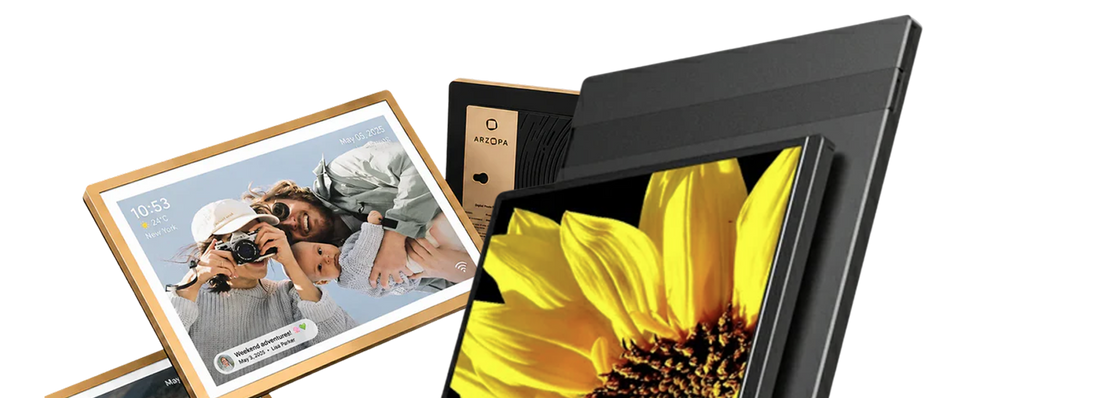
For people who often need to work on the move or enjoy entertainment on the go, a good portable monitor is crucial. There are a variety of portable screens on the market, but if I just want to buy an entry-level one for business use only, is the Arzopa A1 the right choice?The Arzopa A1 focuses on portability, but how does it really perform? Let's take a closer look about Arzopa A1 gamut manual.
Quick Verdict
The Arzopa A1 portable monitor is best for users who want an affordable, lightweight second screen for laptop work, travel, study, and basic entertainment. It is not a high-end gaming or creator monitor, but as a budget 15.6-inch portable monitor, it does the job well.
From a reviewer’s perspective, the A1’s strongest value is simplicity. It gives laptop users more screen space, supports common USB-C and HDMI-style setups, and stays easy to carry. If you need a practical portable monitor for emails, documents, video calls, spreadsheets, schoolwork, or travel productivity, the Arzopa A1 is a sensible choice.
Best for: laptop users, students, remote workers, business travelers, and budget-conscious buyers.
Not ideal for: competitive gamers, professional color grading, 2K/4K workflows, or users who need touchscreen support.
Review Score
| Category | Rating | Reviewer Notes |
|---|---|---|
| Portability | 9/10 | Slim, lightweight, easy to carry with a laptop |
| Setup Ease | 8.5/10 | Simple for USB-C and HDMI-compatible devices |
| Display Quality | 7.5/10 | Good for everyday 1080p work, not premium-level |
| Productivity | 8.5/10 | Strong value as a laptop second screen |
| Gaming | 6.5/10 | Fine for casual gaming, not for high-refresh gameplay |
| Value for Money | 9/10 | One of the main reasons to choose it |
Overall Rating: 8.2/10
Arzopa A1 Portable Monitor Specs
| Feature | Arzopa A1 Portable Monitor |
|---|---|
| Screen Size | 15.6 inches |
| Resolution | 1920 x 1080 Full HD |
| Use Case | Travel, laptop expansion, work, study |
| Connectivity | USB-C and mini HDMI-style portable monitor setup |
| Design | Slim portable display |
| Best Positioning | Budget-friendly portable monitor |
| Ideal Users | Students, travelers, remote workers, laptop users |
Design and Portability
The Arzopa A1 is clearly designed as a travel-friendly portable monitor. The 15.6-inch size feels close to a standard laptop display, which makes it familiar for work and study. It is large enough to improve productivity, but still compact enough to fit into a backpack or laptop bag.
The main advantage is convenience. You can use it at a desk, in a hotel room, in a dorm, at a coworking space, or beside a laptop at home. For people who do not have space for a full desktop monitor, the Arzopa A1 gives a practical second-screen setup without taking over the desk.
As a professional review point, the A1 should be seen as a portability-first monitor. Its design is not about premium materials or flagship specs. It is about giving users a simple, affordable external screen they can actually carry.

Setup and Connectivity
A good portable monitor should be easy to connect, and this is where the Arzopa A1 performs well for everyday use. It is designed for laptop expansion and can work with many devices through USB-C or mini HDMI-style connections, depending on your device output.
For the best experience, users should check whether their laptop USB-C port supports video output. If the USB-C port supports display signal and power, setup can be very simple. If not, HDMI plus separate power may be needed.

This is not unusual for portable monitors, but it is worth explaining clearly in the article because many users search for “portable monitor not working with laptop” after buying one.
Contrast Ratio of Arzopa A1 Portable Monitor
Contrast ratio is one of the key indicators of a monitor's performance, reflecting the ratio of brightness between the brightest and darkest areas of the monitor when presenting an image. For the Arzopa A1 portable monitor, the contrast ratio is 1,200:1.
According to other reviewers, the A1 portable shooter measured even better at 1,221:1, with most competitors having contrast ratios between 600:1 and 1,000:1. The 1,200:1 contrast ratio further enhances the overall visual experience. Dark scenes in movies are truly dark, while bright areas are well - defined, creating a strong sense of depth and dimension. For example, in a horror movie, the pitch - black shadows and sudden bursts of light are effectively portrayed, heightening the suspense.
The A1 gamut Arzopa of color gamut is 45% NTSC. The A1's sRGB colour coverage is 63.3%.

Display Quality: Good Enough for Everyday Work
The Arzopa A1 is a 1080p portable monitor, and that is exactly how it should be judged. It is not trying to compete with 2K, 4K, OLED, or high-refresh displays. Its job is to provide a clear and usable second screen at a budget-friendly price.
For everyday work, Full HD is enough for:
- Emails and documents
- Browser research
- Video calls
- Spreadsheets
- Study notes
- Presentations
- Light entertainment
Text clarity is suitable for regular office and school tasks. The 15.6-inch size also makes the 1080p resolution feel reasonable because the screen is not overly large.
However, users who spend all day reading dense spreadsheets, editing photos, or working with design tools may prefer a sharper 2K portable monitor such as Arzopa Z3FC or Z1RC.
Productivity Performance
The Arzopa A1 is strongest as a productivity tool. A laptop screen alone can feel cramped when you are switching between tabs, documents, messages, and video meetings. Adding a second screen makes the workflow easier.
In a typical remote work setup, you can place:
- A video call on the A1 and notes on your laptop
- A spreadsheet on one screen and a browser on the other
- Research sources on the A1 and a document editor on your laptop
- Slack, email, or project tools on the second screen
This is where the Arzopa A1 feels most useful. It does not need premium specs to make work easier. It simply gives users more visible workspace.

Travel and Student Use
For travelers and students, the Arzopa A1 is a strong fit because it solves a simple problem: you need more screen space, but you cannot carry a desktop monitor.
Students can use it for online classes, research, writing papers, coding assignments, and study notes. Travelers can use it in hotels, temporary offices, airports, or client spaces. Remote workers can use it as a portable second monitor when moving between home, office, and coworking spaces.
The A1 is especially useful for people who want a monitor they can store away after work. If your desk is small or shared, a portable monitor is often more practical than a permanent desktop screen.
Gaming and Entertainment
The Arzopa A1 can handle casual gaming and entertainment, but it should not be positioned as a performance gaming monitor. For users who want to play console games, watch videos, or use a portable screen for casual entertainment, it works well enough.
But for high-refresh-rate gaming, the A1 is not the best choice. Users who want smoother gameplay should consider a 144Hz or 180Hz model such as Arzopa Z1FC or Z3FC.
A fair reviewer-style conclusion is this: the Arzopa A1 is good for casual gaming and media, but its real strength is productivity and portability.

Pros and Cons
| Pros | Cons |
|---|---|
| Affordable portable monitor | Not a 2K or 4K display |
| Good 15.6-inch size for laptop users | Not designed for competitive gaming |
| Easy to carry for travel and school | No touchscreen positioning |
| Useful for remote work and multitasking | Display quality is practical, not premium |
| Strong value for budget buyers | Users needing high refresh rate should choose Z1FC or Z3FC |
Arzopa A1 vs Other Arzopa Portable Monitors
| Model | Best For | Key Difference |
|---|---|---|
| Arzopa A1 | Budget laptop expansion and travel | Simple, affordable 15.6-inch second screen |
| Arzopa Z1FC | Budget gaming + work | 16.1-inch, 144Hz refresh rate |
| Arzopa Z3FC | Premium gaming + productivity | 2.5K resolution, 180Hz refresh rate |
| Arzopa Z1RC | Productivity and creative work | 16:10 screen, 2.5K resolution |
| Arzopa A1S | Ultra-portable travel use | Smaller, lighter travel-focused display |
Choose the Arzopa A1 if you want the most practical budget portable monitor for laptop work and travel. Choose the Z1FC if you want smoother gaming. Choose the Z3FC if you want sharper resolution and stronger overall specs.
Who Should Buy the Arzopa A1?
The Arzopa A1 is recommended for users who want a low-cost portable monitor for everyday productivity.
It is a good choice for:
- Students who need a second screen for classes and research
- Remote workers who need more screen space
- Travelers who work from hotels or coworking spaces
- Laptop users with small desks
- Buyers who want a simple budget portable monitor
- Casual users who need a screen for work and entertainment
It is not the best option for users who need professional color accuracy, high-refresh gaming, 4K detail, or touchscreen workflows.
Final Verdict
The Arzopa A1 portable monitor is a strong budget choice for users who need a simple, lightweight, and practical second screen. It is not the most advanced portable monitor in Arzopa’s lineup, but it does not need to be. Its value comes from being easy to carry, easy to use, and affordable.
For most students, remote workers, travelers, and laptop users, the Arzopa A1 is worth considering as a budget portable monitor for everyday work.
Final recommendation: Buy the Arzopa A1 if you want an affordable portable monitor for laptop expansion, travel productivity, study, and basic entertainment. Upgrade to Z1FC or Z3FC if you need gaming performance or sharper display quality.
FAQ
Is the Arzopa A1 portable monitor worth it?
Yes. The Arzopa A1 is worth it if you want an affordable portable monitor for laptop work, travel, study, and everyday productivity.
Is the Arzopa A1 good for work from home?
Yes. The Arzopa A1 is good for work from home because it gives laptop users a second screen for video calls, documents, spreadsheets, email, and multitasking.
Is the Arzopa A1 good for gaming?
The Arzopa A1 is fine for casual gaming, but it is not the best option for high-refresh-rate gaming. For smoother gameplay, consider Arzopa Z1FC or Z3FC.
Is 1080p enough for a portable monitor?
Yes. 1080p is enough for most portable monitor users, especially on a 15.6-inch screen. It works well for office tasks, study, browsing, and video calls.
Who is the Arzopa A1 best for?
The Arzopa A1 is best for students, remote workers, travelers, laptop users, and budget-conscious buyers who need a simple second screen.
What is the difference between Arzopa A1 and Z1FC?
The Arzopa A1 is a budget portable monitor for general work and travel, while the Z1FC is better for users who want a 144Hz portable gaming monitor.
What is the difference between Arzopa A1 and Z3FC?
The Arzopa A1 is more budget-friendly and focused on basic productivity. The Z3FC offers higher-end specs, including 2.5K resolution and 180Hz refresh rate.
Can I use Arzopa A1 as a second monitor for a laptop?
Yes. The Arzopa A1 is designed to work as a portable second monitor for laptops, making it useful for work, study, and travel setups.

![How Much Brightness & Contrast Is Good for Eyes? [2026] - Arzopa](http://www.arzopa.com/cdn/shop/articles/how-much-brightness-contrast-is-good-for-eyes-2026-3024228.jpg?v=1788850861&width=1200)