


Arzopa A1T 15.6" FHD 100%sRGB Touch Screen Portable Monitor
Regular price
Sale price
$139.99
Regular price
$259.99


🔥 Early Black Friday
$129.99 at Checkout
Discount Auto-Applied


 Free & Fast Shipping
 2-Year Warranty
 30-Day Money Back
Connect your Arzopa portable monitor to laptops, smartphones, tablets, gaming consoles, and more.
 Laptops


 Phones


 Tablets


 Gaming Devices


Arzopa A1T is ideal for business travelers, office professionals, retail cashiers, and commercial users who need an interactive second screen. Its 15.6-inch FHD touchscreen, durable glass panel, and single-rod kickstand make it perfect for mobile multitasking, client presentations, POS kiosk systems, and document signing.
On Windows 11 and 10 devices, the Arzopa A1T is 100% plug-and-play. Connecting your laptop via the included full-featured USB-C cable transmits touch input, video display, and power simultaneously without installing any third-party drivers.
Yes, but with macOS system limitations. Apple macOS does not natively support multi-touch gestures on external third-party displays; therefore, the Arzopa A1T operates in single-point touch (click/drag) on MacBooks. Video output and audio work fully across all compatible Mac models.
Because standard HDMI ports only transmit video and audio signals (not touch data), you need to connect two cables: plug the HDMI-to-mini HDMI cable for the display signal, and connect the included USB-A to Type-C cable between your computer and the A1T to transmit touch signals and power.
Not necessarily. Because the A1T features an ultra-low 7W operating power draw, most modern laptops with full-featured USB-C ports can power the screen and transmit video directly through a single cable. If you use HDMI or your laptop port has low output wattage, connect a standard 5V/2A or 15W+ USB charger or power bank to the secondary USB-C port.
Yes, the A1T supports touch interaction when connected to Android devices that support full-featured USB-C desktop output (such as Samsung DeX mode). Note that iPhones and iPads do not support external touch input due to iOS display output restrictions.
The full glass front panel offers a smooth, responsive surface for finger tapping and dragging while shielding the underlying IPS panel against scratches and dust. It also provides a sleek commercial-grade appearance that is easy to wipe clean in shared office or retail settings.
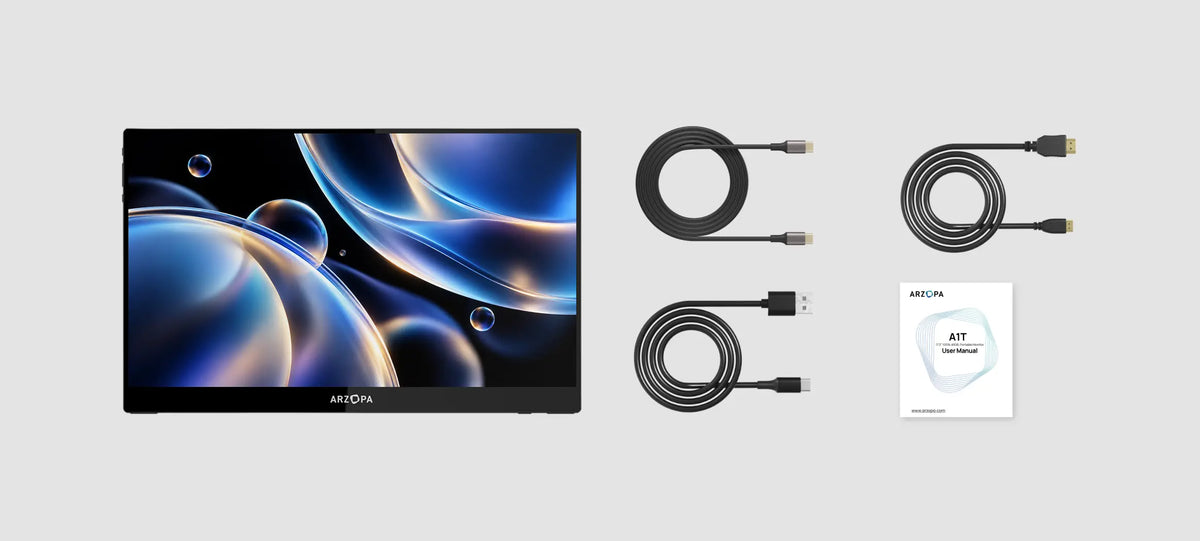
The package includes the 15.6" A1T monitor with built-in kickstand, one 1.0m full-featured USB-C to USB-C cable (video + touch + power), one 1.0m USB-A to Type-C cable (power + touch data), and one 1.0m standard HDMI to mini HDMI cable.
 Best Seller
A 15.6-inch Full HD touchscreen portable monitor for work, creativity and entertainment.
Experience 2.5K clarity and ultra-smooth 180Hz performance in a lightweight 16.1" display — built for work and play anywhere.
Experience stunning OLED visuals in an ultra-light 390g, 13.3-inch display — made for vibrant entertainment and effortless portability anywhere.
15.6"
16.1"
13.3"
1920*1080
2560*1440
1920*1080
16:9
16:9
16:9
60Hz
180Hz
60Hz
No
Yes
No
100% sRGB
107% sRGB
100% DCI-P3
300 nits
400 nits
400 nits
1.96 lbs
1.72 lbs
0.86 lbs
Built-in Stand
Built-in Stand
Built-in Stand
Aluminum Alloy
Aluminum Alloy
Aluminum Alloy
Your cart is currently empty.
Not sure where to start? Try these collections:
| Description |
| Price |
| Type |
| Best For |
| Screen Size |
| Display type |
| Resolution |
| Aspect Ratio |
| Refresh Rate |
| Variable refresh rate |
| Color Gamut |
| Brightness |
| Net weight |
| Connection Mode |
| Built-in Stand |
| Dual Speakers |
| Low Blue Light |
| Housing Material |
| Device Compatibility |
| Auto Rotation |
| Anti-Glare |
| Multi-User Sharing |
| Senior-Friendly |
| Video & GIF Sharing |
| Maximum Video Length |
| Unlimited Cloud Storage |
| Subscription Required |
| Wall Mountable |

Arzopa A1T 15.6" FHD 100%sRGB Touch Screen Portable MonitorRegular price
Sale price
$139.99
Regular price
|
| Regular price
Sale price
$139.99
Regular price
| Portable Monitor | Productivity / Entertainment | 15.6" | IPS | 1920*1080 | 16:9 | 60Hz | No | 100% sRGB | 300 nits | 1.96 lbs | USB-C (DP Alt Mode) / Mini HDMI | Built-in Stand | Yes | Yes | Aluminum Alloy | Laptops / MacBooks / Desktop PCs / Smartphones / Tablets / Steam Deck / ROG Ally / Nintendo Switch / PS5 / Xbox | — | — | — | — | — | — | — | — | — |


